
Standing Desk Ergonomics for Home Office Setups
Dickson LamStanding desk ergonomics comes down to four checkpoints: set the desk to elbow height so your arms bend at about 90 degrees, put the top of your monitor at or just below eye level, stand on a cushioned surface, and switch between sitting and standing through the day. Get those four right and most of the strain from long screen days goes away.
At effydesk, we design electric standing desks in Vancouver, and we hear the same setup questions every week. This guide walks through each checkpoint, with a quick sitting vs standing table and a checklist you can use today.
What Is an Ergonomic Standing Desk Setup?
An ergonomic standing desk setup is a workstation where the desk, monitor, keyboard, mouse and chair all adjust to your body, so you keep a neutral posture whether you sit or stand.
In practice, that means a height-adjustable desk that moves between sitting and standing heights, paired with an ergonomic chair that supports your lower back and lets your shoulders stay relaxed. Your feet rest flat on the floor, your wrists stay straight, and your neck stays level instead of tilting down at a laptop screen.
Small details matter. Keep your keyboard and mouse close enough that your elbows stay by your sides, and keep the number pad from pushing your mouse too far out. A few minutes of adjustment at the start makes every hour at the desk more comfortable.
Why Use a Sit-Stand Desk Instead of a Fixed Desk?
A sit-stand desk lets you change posture during the day, which a fixed desk cannot do. Moving between sitting and standing breaks up long static periods that leave your back, neck and legs stiff.
Research suggests that alternating positions may ease lower back discomfort and help you sit less overall. Switching also gives your wrists, neck and eyes a reset each time you change height, and it nudges you to move more.
The key is the switch itself, not standing all day. A desk that moves quickly and quietly makes changing position easy enough that you keep doing it. Every effydesk electric standing desk (Nimble, Terra, Wildwood and Grove) lifts at 35 mm/s, runs under 45 dB and stores your heights in 4 memory presets, so one button press takes you from sitting to standing.
How High Should Your Standing Desk Be?

Your standing desk should sit at elbow height, so your forearms rest parallel to the floor and your elbows bend at roughly 90 degrees while you type. The same rule applies when you sit.
Stand tall with your shoulders relaxed and your arms by your sides, then bend your elbows. The desk surface (or your keyboard) should meet your hands at that height. If your shoulders creep up, the desk is too high. If you lean forward or your wrists bend up, it is too low.
effydesk standing desks adjust from 23" to 50" (58 to 127 cm), which covers most adults sitting and standing. Our guide on how high a standing desk should be goes deeper, and the ergonomic desk height calculator gives you a starting number based on your height. Taller users can also read our tips on choosing a standing desk for tall people.
How Should You Position Your Arms, Wrists and Keyboard?

Keep your elbows close to your body at about 90 degrees, with your wrists straight and your keyboard and mouse at the same height. This neutral position lowers strain on your shoulders, forearms and wrists.
Avoid reaching forward for the mouse or resting your wrists on a hard desk edge. A split keyboard or an ergonomic mouse can help if you feel tension in your hands. Pay attention to the number pad too: on a full-size keyboard it pushes the mouse further out, so a compact keyboard keeps your mouse hand closer.
A soft surface under your forearms also helps. Our Desk Pad ($55, 31.5" x 15.7") gives your wrists and mouse a smooth, cushioned base, and the wider range of ergonomic desk accessories covers the rest of your setup.
Where Should Your Monitor Go at a Standing Desk?

Your monitor should sit directly in front of you, about an arm's length away, with the top of the screen at or slightly below eye level. Your eyes should land naturally on the top third of the screen.
This keeps your neck in a neutral position instead of tilting down or craning up. If you use two screens, put your main monitor straight ahead and the second one to the side, angled toward you, so you turn your head less.
Because your eye level changes when you stand, the monitor has to move with the desk. A monitor arm makes fine adjustments easy. Our monitor desk mounts adjust for height, tilt and rotation: the Single Monitor Arm ($115) fits 17" to 36" screens, and the Dual Monitor Arm ($175) holds two 17" to 32" screens.
Do You Need an Anti-Fatigue Mat?
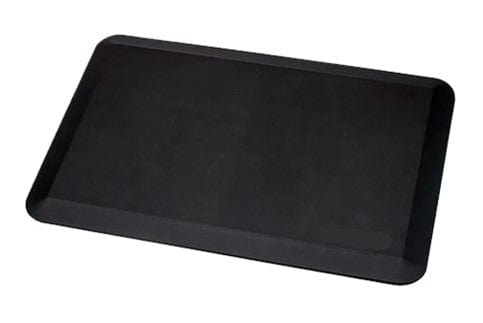
Yes, if you stand for more than short stretches. An anti-fatigue mat cushions your feet and encourages small shifts in posture, which reduces pressure on your feet, knees and lower back.
Standing on a hard floor for long periods tires your legs quickly. A mat gives you a softer surface and makes it easier to keep your weight balanced. Stand with your feet about hip-width apart and your body upright, not leaning on the desk.
Our anti-fatigue standing mat ($65 or $80, depending on size) is made to sit under your desk and blend in with your workspace. Supportive shoes help too.
How Often Should You Switch Between Sitting and Standing?
Switch between sitting and standing every 30 to 60 minutes, and add a short walk or stretch in between. Regular movement matters more than the exact split between sitting and standing.
Standing all day brings its own problems, such as tired legs and a sore lower back. The benefit comes from variety: changing position improves comfort, keeps you more alert and stops any one muscle group from carrying the load for hours. Keep your spine neutral in both positions.
When you sit, a good chair makes a big difference. Pair your desk with one of our ergonomic chairs with adjustable lumbar support, and set the chair height first so your feet rest flat before you lower the desk to elbow height.
What Changes Between Your Sitting and Standing Setup?
The ergonomic rules stay the same in both positions, but the desk height, monitor height and foot support all change when you stand. Use this table to check each setting.
| Setting | When sitting | When standing |
|---|---|---|
| Desk height | Elbow height with feet flat on the floor, about 90 degrees at the elbow | Elbow height with shoulders relaxed, about 90 degrees at the elbow |
| Monitor | Top of screen at or slightly below eye level, an arm's length away | Raise the screen with the desk or monitor arm to keep the same eye line |
| Keyboard and mouse | Close to the body, wrists straight | Close to the body, wrists straight |
| Feet | Flat on the floor or a footrest, knees near 90 degrees | Hip-width apart on an anti-fatigue mat |
| Back support | Chair lumbar support fills the curve of the lower back | Stand tall, weight balanced, no leaning on the desk |
| Time in position | 30 to 60 minutes, then change | 30 to 60 minutes, then change |
Save both heights to your desk's memory presets once they feel right, so you never have to guess again.
What Are the Most Common Standing Desk Setup Mistakes?
The most common standing desk mistakes are leaning forward, setting the monitor too low, skipping a mat and standing for too long without a break. Each one shifts strain onto your back, neck or legs.
-
Leaning forward or resting on your forearms puts pressure on your lower back and neck.
-
A monitor that sits too high or too low forces your neck out of a neutral position.
-
Working on a laptop without a stand makes you hunch. Raise the screen to eye level and use a separate keyboard.
-
Forgetting to adjust your chair height when you sit again leaves your back and legs unsupported.
-
Skipping breaks, or never switching positions, leads to stiffness and poor circulation.
Fixing these takes only a few small adjustments, and the payoff is a setup that stays comfortable all day. For more detail, read our guide on how to use a standing desk properly.
Ergonomic Setup Checklist
Use this checklist to confirm your workspace is set up well:
-
Your desk is at elbow height, with your feet flat on the floor when you sit.
-
Your shoulders are relaxed and your spine is neutral.
-
Your monitor is at eye level and about an arm's length away.
-
Your keyboard and mouse sit at a comfortable height and distance.
-
Your chair height supports your back and legs.
-
A wrist rest or desk pad reduces pressure on your wrists.
-
You take regular breaks to stretch and move.
-
You alternate between sitting and standing every 30 to 60 minutes.
-
An anti-fatigue mat reduces strain on your feet and legs.
-
A split keyboard or ergonomic mouse is on hand if your hands or wrists feel strained.
Work through this list once, save your heights, and your workspace will support comfort and focus through the whole workday.
Frequently Asked Questions
Should my keyboard be at the same height when I sit and when I stand?
Your keyboard should be at elbow height in both positions, so the actual desk height changes. Most people need the desk several inches higher when standing. Memory presets on an electric desk save both heights so you can switch with one press.
How far away should my monitor be from my eyes?
About an arm's length is a good starting point for most screens. Larger monitors may need to sit a little further back. If you lean in to read text, increase the font size rather than moving closer.
Is it bad to stand at a desk all day?
Standing for hours without a break can tire your legs and lower back, much like sitting for hours strains your hips and spine. The healthiest pattern is a mix of sitting, standing and walking, with a change every 30 to 60 minutes.
Can I use a laptop at a standing desk?
Yes, but raise the laptop screen to eye level with a stand or monitor arm, and use a separate keyboard and mouse at elbow height. Typing directly on a laptop at a standing desk forces you to choose between a good neck position and a good wrist position.
What is the height range of effydesk standing desks?
The Nimble, Terra, Wildwood and Grove standing desks all adjust from 23" to 50" (58 to 127 cm). That range fits most adults in both sitting and standing positions, and each desk comes with a 20-year warranty on the frame, motors and electronics.